Linux Capabilities in theory
2026-02-02
Linux capabilities are a mess...
What should be a simple set of rules for governing different privileges becomes very unintuitive very quickly! This post is my attempt at untangling this unholy mess of bits. I doubt I'll be able to cover everything but I'll try to give an overview of how the system works.
This is probably a good time to mention that there's going to be a lot of threads, forks and clones flying around in a minute. If you don't have a good understanding of how threads work in Linux I highly recommend reading up on them as capabilities are very much tied to threads and the rest of the post won't make much sense without some prerequisite knowledge!
Furthermore if you're left wanting to know more about capabilities feel free to read the capabilities man-page! But first, what are we trying to accomplish with capabilities?
The monolithic root
Once upon a time there used to be a user and the root.
Running a program under a normal user is fine.
Everything behaves as one would expect.
Permissions are checked based on the effective user ID (UID), group ID (GID) and so on.
The issue comes when we want to do some task that only
a root can do (such as creating an arbitrary network socket).
There used to be only one way of doing this and that is
somehow running that task under the root user (UID=0).
The problem with this approach is that if the program running
under root gets compromised it gets full root level access
for free even if it only needed to open a network socket.
You can probably see that this is less than ideal. That's why the POSIX 1003.1e draft was created. It introduced a bunch of security related enhancements including access control lists, auditing and capabilities. You can read about them in Section 25 of the POSIX 1003.1e Draft 17. While this draft was later withdrawn it served as a base for the Linux capabilities we have today.
The solution proposed was that one could associate one or more capabilities with a process or a file, capabilities associated with a process could be enabled or disabled and passed down to child processes and the kernel the wouldn't check against the user ID but would check against the active set of capabilities for the specific process which meant that we wouldn't have to taint the process with full root level access!
But this post is about Linux capabilities and although the Linux capabilities are certainly inspired by the POSIX draft they were never a full implementation of that draft and have evolved quite a bit since their initial introduction to the kernel.
Bits and flags
In Linux a capability set is represented as
a 64-bit bitmask1 (an unsigned 64-bit number)
where each bit represents a specific capability.
If it's 0 that means that the capability is not present
in the capability set. If it's 1 it means the capability is present.
In the
kernel 6.18.7
there are 41 capabilities defined and you can look at the definitions in
/include/uapi/linux/capability.h.
This means that the topmost 23 bits are left unused.
If you wanted to know the highest supported capability
(which is 40 for kernel 6.18.7) you can do cat /proc/sys/kernel/cap_last_cap.
This is not exactly 100% correct but it'll suffice for this post.
But there's more!
Somewhere above I said that capabilities can be given to specific processes or files. Wait what? To specific processes or files? How does that make any sense? Well there are two types of capabilities! There are thread capabilities and file capabilities and lot of talks and articles focus only on file capabilities or don't differentiate them at all.
Thread capabilities are kind of like the effective, real and saved UIDs in the sense that they're associated with a specific thread and file capabilities are kind of like the set-UID bit for some files but instead of specifying a specific user ID we specify sets of capabilities.
The problem is that explanation of one relies on understanding of the other one. I'm going to start with thread capabilities and then go over file capabilities. Some things might not be entirely clear from the first reading so be prepared to reread the next two sections.
For clarity's sake I'm going to refer to thread capability sets as just capability sets and file capability sets with the file prefix. So permitted set is the thread permitted set while file permitted set if... well a file permitted set.
Thread capabilities
As I said above the thread capability sets fill a similar purpose as the UIDs and GIDs that each thread has. Each thread has a set of 5 capability sets with each one having a different purpose, rules and ways of manipulating them.
There are 5 thread capability sets:
- Effective set
- Permitted set
- Inheritable set
- Bounding set
- Ambient set
There are quite a list of rules that govern how these sets interact with each other. I won't go over every rule and exception but rather I want to build intuition for the usage of these differents sets and how they fit together. Armed with this knowledge you should be able to read the documentation and read up on any specifics that you're after.
Effective set
This is the most most important capability set
as it's the one that the kernel checks when
trying to authorize some privileged operation.
If a process wants to do a privileged operation,
the kernel will check if the capability required
for this operation is in the effective set.
If you run a program as root the kernel will
assign a full set of capabilities to the created process.
As it stands we have to run with the elevated privileges all the time. It would be good if we could enable and disable these capabilities on demand so that we're running in the elevated mode for the shortest time possible.
This is where the permitted set comes in.
Permitted set
The permitted set is basically a set of capabilities that we can at any time activate by copying the over to our effective set. If we drop a capability from the effective set we can still activate it again if we leave the capability in the permitted set.
It's a limiting superset of the effective set which means that whatever capabilities we have in the permitted set, we can also have in the effective set but we can't have capabilities in the effective set that are not in the permitted set.
If we drop a capability from this set,
we can't ever get it back
(at least not without performing an execve).
Inheritable set
This is the set of capabilities that a process inherits after execve.
If I'm creating a child process, I can put some capabilities into
the inheritable set and upon creating the new process
(via execve) these capabilities will be put into the permitted set
of the child process.
There's a small caveat to this. This inheritable set is masked by the file inheritable set which means that our child won't inherit anything if file inheritable set is empty (more on this later). This is actually what the ambient set was created to fix!
Bounding set
The bounding set is a set that can be used to limit the
capabilities gained during execve.
You can't add a capability to the inheritable set
unless it's also in the bounding set
and it limits the file permitted set when
doing an execve.
Important property of the bounding set is that
you can't add anything to it.
That means that if you drop a capability
from the bounding set you can't ever get it back
and you can only drop capabilities with
the important requirement of having the CAP_SETPCAP capability!
See the
sendmail capabilities issue
to learn why this restriction was introduced.
Ambient set
As described before the ambient set is used to allow passing on certain capabilities to child processes (especially scripts).
This is very useful in situation where we're trying to execute some script via an interpreter. Let's take a capability aware python script as an example. Setting the correct capability bits in the thread inheritable set won't work here as the rules require the bits to also be present in the file inheritable set. Since the Python interpreter binary usually doesn't have any file capabilities, the "empty" file inheritable set masks any capability bits in the thread inheritable set effectively loosing all of the capabilities.
This is where the ambient set comes in!
We'll set the correct capabilities in the ambient set.
When the execve comes, this ambient set will
get added to the permitted set and effective set2 of the new program
thus effectively inheriting these capabilities!
If this didn't make much sense don't worry! Continue on reading about file capabilities and return to this part or perhaps re-read the whole thread capabilites section.
This happens only if the file is not privileged
(doesn't have any setuid or setgid bits
but also doesn't have any file capabilities set)
Modifying capability sets
There are surprisingly only a couple of rules that have to be followed here. Don't celebrate early though, there are plenty of edge cases and other rules to be aware of!
The rules for modifying capability sets are as follow:
- New effective set must be a subset of the new permitted set
- You can only activate capabilities you were permitted to use
- New permitted set must be a subset of the old permitted set
- You can't just acquire new capabilities (obviously)
- The new inheritable set must be a subset of old inheritable set,
new permitted set and the bounding set
- The requirement to be a subset of the new permitted set
is lifted if the caller has the
CAP_SETPCAPcapability as theCAP_SETPCAPcapability grants the ability to add any capability from the bounding set to the inheritable set (and also grants the ability to
- The requirement to be a subset of the new permitted set
is lifted if the caller has the
So to modify:
-
Effective set
- Raising - You can add from the permitted set
- Dropping - No restriction
-
Permitted set
- Raising - Not possible
- Dropping - No restriction but dropping a capability will automatically drop it from the ambient set too
-
Inheritable set
- Raising - You can add from the permitted set or from bounding set if you have
CAP_SETPCAP - Dropping - No restriction but dropping a capability will automatically drop it from the ambient set too
- Raising - You can add from the permitted set or from bounding set if you have
-
Bounding set
- Raising - Not possible
- Dropping - Requires
CAP_SETPCAP- Note: Removing a capability from the bounding set won't remove it from the inheritable set!
-
Ambient set
- Raising - The capability must be present both in the
permitted set and the inheritable set
and raising can be disabled with the
SECBIT_NO_CAP_AMBIENT_RAISE - Dropping - No restriction
- Raising - The capability must be present both in the
permitted set and the inheritable set
and raising can be disabled with the
File capabilities
Yes, files can have capabilities and they're somewhat similar
in function to the traditional set-uid bit in that
they allow the executed program to gain some
capabilities it couldn't have gotten from an
unprivileged or less privileged user.
There are 3 components of file capabilities
and all of them are stored in the extended attributes (xattr).
Extended attributes are basically key-value pairs associated
with files and directories.
The 3 components are:
- Effective bit
- Permitted capability set
- Inheritable capability set
Effective bit
The effective bit is basically a backwards compatibility mechanism for programs that don't have support for capabilities and thus don't know how to raise or lower them from the permitted set.
In that case we can set the effective bit which will tell the kernel to copy every capability from the calculated thread permitted set to the thread effective set.
Example of use the effective bit in the ping command
This is mainly useful for programs that previously used set-uid flag of 0 (root)
that can be now given only the capability they really need.
This was previously useful for example for the ping command.
Instead of running with set-uid-root the ping command
could be given only the CAP_NET_RAW capability for creating ICMP sockets.
Note that specifically for ping this is not used anymore
as there's now a sysctl parameter net.ipv4.ping_group_range
which specifies the range of group IDS
in which an unprivileged user can create ICMP echo (ping) packets.
This is usually set to cover the whole group ID (GID) range
which means that you can send pings without any privileges.
Permitted set
This set is masked by the bounding set and added to the resulting thread permitted set. These are basically the capabilities the program is guaranteed to receive unless the bounding set restricts it.
Inheritable set
This set is masked by the thread inheritable set and added to the resulting thread permitted set. These are capabilites the program can receive based on the setting of the thread inheritable set.
Together with setting the file effective bit
to 0 and setting the file permitted set to be emtpy
we can effectively control which capabilities we
will receive in our thread permitted set.
Transformation of capabilities during execve()
Instead of trying to explain it in words
I've drawn a crude diagram that describes the
capability transitions during execve
which you can consult if you're unsure of how one
capability set relates to another.
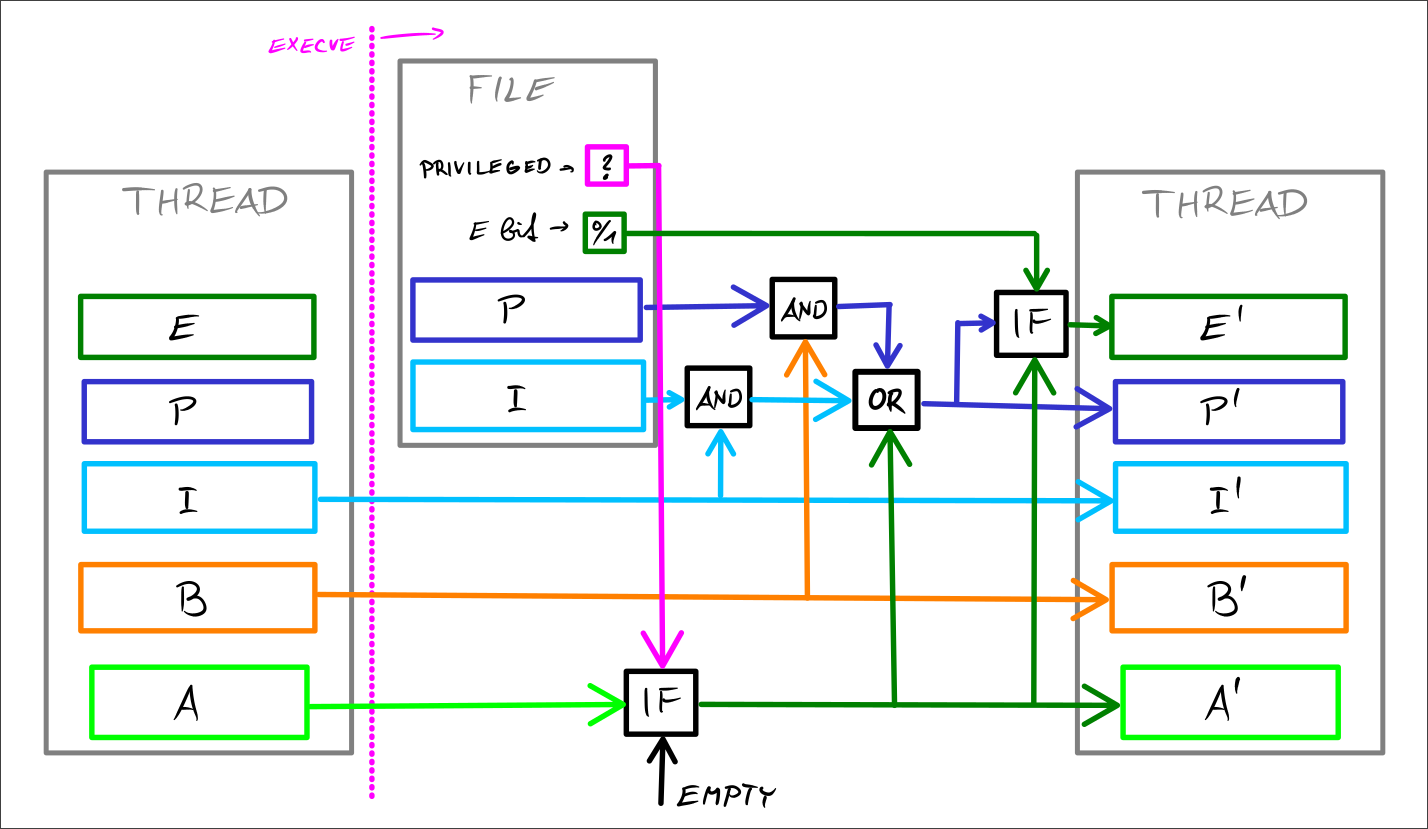
I've taken inspiration from this now outdated article which has quite a nice diagram at the end. It's only a crude version for now and I'm going to create a nicer version in Typst sometime later.
Caveats
I haven't covered everything there is to know about capabilities so here are some things I've skipped over but are pretty easy to understand from the documentation:
-
Special handling of UID 0 (
root)- I've touched on this but didn't go into all of it
-
Effect of user ID changes on capabilities
- There's some capability set clearing when changing some user ID (effective, real or saved) to be aware of
-
Securebits
- These allow you to disable some of the special
handling of UID 0 (
root) but also allow you to fix these settings so future threads in the tree can't change them
- These allow you to disable some of the special
handling of UID 0 (
-
Using capabilities inside a user namespaces
- For the most part this works as you would expect given the UID/GID mappings, etc.
Final thoughts
Linux capabilities aren't exactly easy to understand and the documentation isn't written in a way that lends itself easily to understanding the intentions behind the different capability sets and the different rules governing them.
I had to re-read the man page for capabilities multiple times before I had at least some idea of how all of these sets fit together and I wouldn't expect any ordinary developer to have the patience to piece this together.
If you're after an explanation in audio form I recommend a talk by Gerlof Langeveld called Practical use of Linux capabilities. It's a pretty good introduction into capabilities and I think it would've helped me had I found it before writing this post!